
I often get asked for plugin suggestions for SEO, speed, tables, affiliate content etc. To help you on your journey to improving your WordPress websites and to avoid some of the mistakes I’ve made over the years, we’ve documented the must have plugins that we install on every website we work on.
Picking the ‘best’ WordPress plugins and tools can be the difference between the success and failure of a website. Each plugin adds additional files and ‘bloat’ to your site, so being extremely picky with your plugins will help to keep your site as ‘light’ and quick for your users. All of my recommended plugins take into account the size and speed of the plugin – the lighter the better in our eyes.
As with most things in WordPress – if you aren’t using a plugin, make sure to deactivate and delete it. Not only will it add bloat to your site, but it also helps to reduce the risk that the plugin has a vulnerability in the future.
We aren’t affiliated with any of the plugins that we mention below, they are all featured on merit :)
Best Plugin for SEO – RankMath
As an SEO at heart, I’ve tried and tested a lot of SEO plugins in the past, and RankMath tops them all. 99% of the websites we buy have Yoast for SEO installed, and one of the first moves we make is to install RankMath and import all of the data over from Yoast (single click).
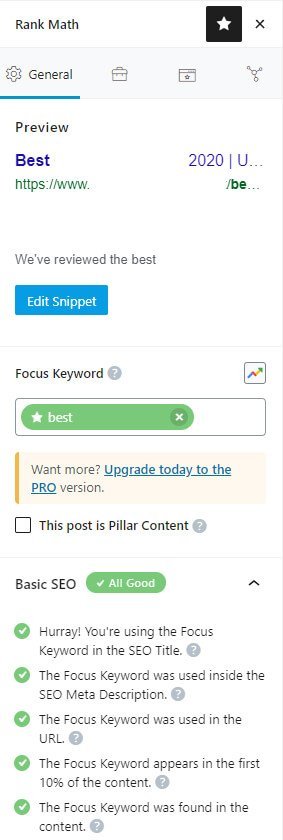
RankMath is faster (7.3MB vs 11.9MB for Yoast, with around 380 less files to run it) and contains way more features that help to speed up most tasks for me. I use the free version of RankMath, but I will likely test the paid version at some point due to the value it provides me.
Specifically, I love that the free version allows you to add up to 5 keywords per post to target, and automatically scores your content for optimisations. The plugin is beginner friendly and ensures beginners don’t overdo it with keyword optimisation!
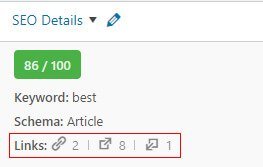
The other feature I really like is the internal link tracking, which at a glance allows you to see how many internal & external links are included in a post. It also flags the number of posts that link to the post, helping you very easily highlight quick wins by improving internal links to your content. You can check out all of RankMaths features here.
Best for Analytics – MonsterInsights
MonsterInsights make it super easy to add in analytics tracking and help you to focus on improving the highest priority content first. I love the fact it automatically adds event tracking to track affiliate links on our website and also tracks things like scroll depth to help highlight posts that aren’t hitting the spot with users.
We use the premium version of MonsterInsights, but the free version makes adding and managing analytics implementation a doddle without having to worry about inserting it into your theme or using tag manager.
Best for our Theme… – GeneratePress Premium
GeneratePress premium is a plugin that is installed on all of our websites, but it is actually the premium blocks associated with the GeneratePress theme (so a bit of a cheat…)
We use GeneratePress on our content and affiliate websites as it is without doubt one of the fastest and most lightweight themes there is. It looks brilliant, and the premium version comes with a number of layouts and features that allow you to create beautiful content sites.
The reason we love GeneratePress is that it is built to be fast. It doesn’t come with the bells and whistles of many other themes, instead allowing you to add these through plugins to avoid any bloat created by unused features.
We recently converted a website that we purchased to GeneratePress that was previously using Thrive Architect, and our Google Page Insights score improved from 38 (3.1MB of resources) to 98 (321KB of resources).
Best for Blocks (Gutenberg) – GenerateBlocks
This is a very simple but flexible block builder that introduces incredible versatility to your editor without bloating it with tonnes of one-dimensional blocks.
We moved away from WordPress editors due to the bloat they add to our sites, but GenerateBlocks allows us to simply edit blocks using containers, grids, headings and buttons. Once you have learnt how to use them, GenerateBlocks gives you the freedom to build beautiful blocks whilst keeping your site as fast as it can be.
Best for Speed – SG Optimiser
Unfortunately the SG Optimiser plugin only works with sites who use Siteground to host their website. We love Siteground as a host for our sites, they provide a very affordable, but performance driven hosting that outperforms many of its competitors.
An added benefit of hosting with Siteground is the SG optimiser which gets installed with every WordPress one click installation. We have found it to outperform many other speed plugins and the simplicity and performance of it makes it a must have for all of our sites.
Best for Amazon Affiliates – AAWP / Lasso
This really depends on your budget, but both AAWP and Lasso provide amazing functionality to manage your Amazon affiliate links using the Amazon API. Both plugins offer features that include comparison tables and best of lists that convert your standard blog post into an eye catching conversion machine!
AAWP is the cheaper of the two, but Lasso definitely wins overall with its design and additional functionality.
Best for Tables – TablePress
There isn’t much to say about this plugin, other than it helps to very quickly setup basic tables that you can import into your posts using shortcode. They are easy to setup, maintain and modify, and look much nicer than the default tables available in WordPress.
Best for Table of Contents – LuckyWP Table of Contents
There are hundreds of plugins out there that offer the functionality to add a table of contents to your content but we have plumped for LuckyWP table of contents. The plugin is fairly lightweight compared to some of the other plugins out there (but there may be new ones that are faster), and it offers easy (and good design) functionality to automatically add contents links in our guides.
These are must have for ‘best of’ affiliate posts that will gain you sitelinks on your posts when they are ranked well in Google.
Additional Plugins that are awesome but not needed on all our sites
- Advanced Custom Fields – great for creating custom content blocks in your admin
- WidgetLogic – The go to plugin for managing whether to show or hide widgets on specific posts / pages
- Code Snippets – Run PHP code without having to change functions.php = less bloat
- EditorsKit – Apply custom CSS to to blocks in Gutenberg without adding bloat
- Search WP – The best ‘Search’ function for a WordPress Website